

Quick Summary
Modern clinic management software unifies patient scheduling, digital medical records, billing workflows, and inventory tracking into one secure digital portal. Small clinics eliminate manual paperwork, reduce appointment no-shows, and speed up insurance claims. This operational upgrade lowers overhead costs, improves patient care, and protects independent practices from financial loss.
Modern clinic management software unifies patient scheduling, digital medical records, billing workflows, and inventory tracking into one secure digital portal. Small clinics eliminate manual paperwork, reduce appointment no-shows, and speed up insurance claims. This operational upgrade lowers overhead costs, improves patient care, and protects independent practices from financial loss.
Running an independent medical practice brings immense daily pressure. Doctors often spend hours wrestling with messy paper charts, chasing late payments, and answering ringing phones. Patients sit in crowded waiting rooms feeling frustrated and ignored. These daily operational bottlenecks drain your clinical staff and hurt your monthly revenue.
In early 2026, healthcare workforce studies showed that administrative burdens caused 61% of private practice physicians to experience severe burnout. Running a clinic on paper records or disconnected spreadsheets exposes your team to costly billing errors and missing patient files. Forward-thinking providers now adopt dedicated Clinic Management Software to regain control of their daily clinical operations. This single operational change restores balance to your workday and helps your practice thrive.
The Hidden Cost Of Manual Administrative Work
Paper charts and generic desktop spreadsheets create friction at every step of the patient journey. Front desk receptionists waste valuable time searching through filing cabinets for medical histories while phone lines remain jammed. Meanwhile, physicians must hurry through clinical consultations just to complete manual paperwork before the day ends. These outdated habits slow down patient check-ins and increase the risk of lost documentation.
Administrative chaos also damages your practice’s cash flow. In 2025, medical billing research revealed that small clinics lost an average of $38,000 annually because of delayed insurance claims and uncollected copays. Staff often misplace paper charge sheets or enter incorrect diagnostic codes. A modern digital platform stops these expensive mistakes by standardizing every daily clinical entry.
Outdated systems push modern patients toward larger hospital networks. Today’s healthcare consumers want seamless self-service options like online booking, automated text reminders, and digital payment receipts. When an independent clinic fails to offer these conveniences, patient retention drops quickly. Investing in a connected platform keeps your independent practice competitive and organized.
Why Small Clinics Need Dedicated Digital Systems
Small practices face distinct financial and staffing challenges that large hospital chains never experience. A private clinic cannot hire an army of administrative clerks to correct billing mistakes or manage appointment schedules. Every employee must work efficiently to keep the facility profitable and compliant with local healthcare rules. Modern software automates routine daily chores so your small team achieves enterprise-level productivity.
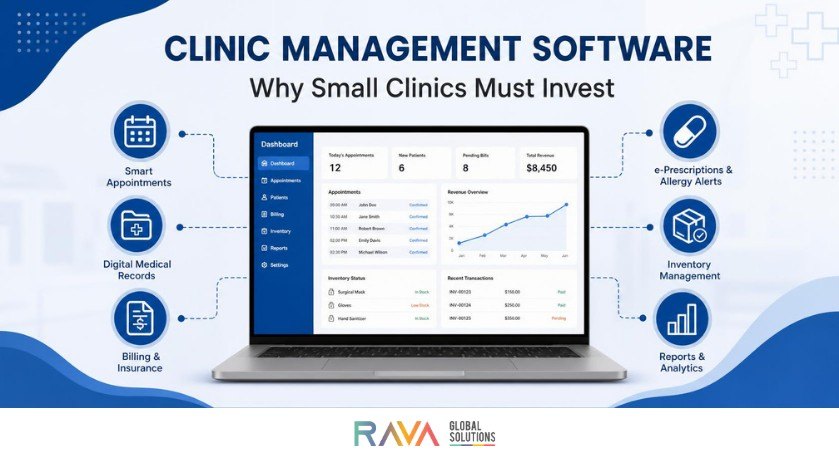
The main benefit is unified operational control. When a patient schedules a visit online, the system instantly creates an electronic chart, checks insurance eligibility, and reserves the consultation room. Doctors review past treatments on a tablet, enter prescriptions with two taps, and generate billing invoices instantly. This seamless connection removes repetitive data entry and protects your staff from exhaustion.
Patient safety improves significantly when your clinical team uses standardized electronic charts. Digital tools alert clinicians to dangerous medication allergies and drug interactions before writing a prescription. Automated follow-up messages also remind chronic care patients to schedule routine blood tests on time. Better communication produces healthier clinical outcomes and builds long-term loyalty between patients and your clinic.
The Contrast: Manual Processes Versus Digital Systems
Transitioning from physical files to an automated software environment transforms daily clinic productivity. The comparison table below displays how a unified digital system upgrades key operational areas.
| Operational Area | Traditional Manual Clinic | Basic Generic Spreadsheet | Modern Clinic Platform |
|---|---|---|---|
| Patient Appointment Booking | Phone calls and manual paper ledgers | Basic shared calendar with no alerts | Automated 24/7 web booking with SMS alerts |
| Medical Record Access | Physical retrieval from file cabinets | Static text files with zero audit logs | Instant cloud access with role-based security |
| Billing and Claims | Hand-written invoices and paper claims | Manual formulas prone to costly errors | One-click insurance filing and online payments |
| Prescription Handling | Hand-written slips prone to misreading | Printed templates lacking safety checks | Integrated electronic prescriptions with allergy alerts |
| Inventory Tracking | Visual stock counts at month end | Manual data entry with frequent discrepancies | Automated stock deductions with reorder alerts |
Upgrading to an integrated system eliminates communication breakdowns across your front desk, consultation room, and billing office. Selecting the right platform sets the operational standard for your future clinical growth.
Core Operational Features That Drive Real ROI
Small clinics must choose software that solves immediate operational challenges rather than adding unnecessary features. Learning more about choosing clinic management software helps owners avoid paying for bloated enterprise tools they will never use.
- Smart Appointment Scheduling: The platform sends automatic text and email reminders to patients before their visits. This single capability reduces costly clinic no-shows by up to 40% in the first quarter.
- Integrated Electronic Health Records: Clinicians access complete patient histories, diagnostic lab reports, and past treatment plans on any device. Fast record access saves doctors up to two hours of daily administrative charting.
- Point-of-Sale and Automated Billing: The system generates itemized bills immediately following a patient consultation. Patients settle balances using credit cards, digital wallets, or secure online links before leaving the premises.
- Automated Pharmacy and Consumables Tracking: The platform updates medicine inventory counts whenever a doctor confirms an in-clinic procedure. Clinic managers receive automatic notifications when essential clinical supplies reach minimum safety levels.
Evaluating key clinic management software features ensures your technology investment generates measurable financial returns from day one.
Real-World Scenarios And Clinic Success Stories
The Overwhelmed Two-Doctor Pediatric Practice
The Clinical Dilemma: A busy family pediatric practice managed patient appointments through telephone calls and paper files. Two front-desk receptionists spent their mornings answering calls, leaving parents waiting up to forty minutes in the lobby. Billing errors caused a 19% initial claim rejection rate, severely restricting practice cash flow.
The Digital Transformation: The practice partnered with RAVA Global Solutions to implement an intuitive, cloud-based platform featuring self-service online scheduling and automated insurance verification.
The Operational Result: Patient wait times fell from forty minutes to under ten minutes within thirty days. Digital claims submissions cut billing rejections down to less than 2%, while automated appointment reminders recovered $4,200 in monthly revenue.
The Multi-Location Dental Group
The Clinical Dilemma: An expanding dental practice operated three clinical sites using isolated desktop software packages. Doctors couldn’t access patient treatment records or X-ray images when patients visited other branch locations. Disconnected billing systems made revenue consolidation a painful, five-day monthly nightmare for the owner.
The Digital Transformation: RAVA Global Solutions migrated all three dental facilities to a centralized, cloud-hosted clinic system with real-time record synchronization.
The Operational Result: Dentists accessed treatment histories across all locations instantly, improving patient care and eliminating duplicate diagnostic imaging. The clinic owner consolidated monthly financial accounts in two hours instead of five business days.
Four-Step Implementation Guide For Small Clinics
Adopting new software requires careful planning to prevent workflow disruptions and staff confusion. Practice managers should execute this digital transition using a structured, step-by-step approach.
- Audit Clinical Workflows: Document your existing patient intake, clinical charting, and billing steps on paper. Identify specific bottlenecks where your reception staff or nurses lose the most time during a typical workday.
Practitioner Insight: Shadow your front-desk team during peak morning check-in hours to discover the exact friction points that cause patient lines.
- Clean and Migrate Master Records: Scrub duplicate contact entries, obsolete phone numbers, and outdated patient files before importing data into the new platform. Standardize your treatment fee schedules, diagnostic codes, and medication lists for consistent reporting.
Practitioner Insight: Import only active patient records from the past twenty-four months to keep your primary production database fast and clutter-free.
- Train Staff In Structured Roles: Conduct focused training sessions for receptionists, nurses, and doctors based on their specific daily tasks. Provide simple visual cheat sheets near workstations to answer common operational questions quickly.
Practitioner Insight: Designate one enthusiastic administrative staff member as your internal super-user to guide colleagues during the initial launch week.
- Launch in Controlled Phases: Run appointment booking and electronic patient intake first before activating automated billing and digital insurance processing. Confirm daily accounting balances every evening during the first two weeks of full system operation.
Practitioner Insight: Schedule your software launch on a Friday or a slow mid-week afternoon so your clinical team practices without overwhelming lobby pressure.
Essential Best Practices For Ongoing System Health
Assign Strict User Permissions: Restrict clinical record access based on employee job responsibilities to protect confidential medical histories.
- Maintain Daily Automated Cloud Backups: Safeguard sensitive patient files with encrypted offsite cloud storage to prevent devastating data loss.
- Review Financial Audit Logs Weekly: Compare completed patient appointments against daily collected revenue to detect billing oversights promptly.
- Solicit Continuous Patient Feedback: Ask regular patients about their digital booking and check-in experience to improve clinic communication.
Frequently Asked Questions
What is the average cost of clinic management software for a small clinic?
Small clinics typically pay between $80 and $250 per month for modern cloud-based software subscriptions. Most reputable software providers charge a predictable monthly fee based on the number of practicing doctors rather than charging large upfront licensing fees. This subscription model includes automated system updates, secure data backups, and technical support without extra hardware expenses.
How does clinic software reduce appointment no-show rates?
Automated text and email reminders notify patients about upcoming appointments twenty-four and forty-eight hours in advance. Patients can confirm, reschedule, or cancel visits with a single tap on their mobile phones. This prompt communication allows clinic staff to fill canceled appointment slots quickly, protecting daily practice earnings.
Is cloud-based clinic software secure enough to protect patient privacy?
Cloud-based healthcare software uses enterprise-grade data encryption to secure patient medical records both in transit and at rest. Leading software providers adhere strictly to international healthcare security standards such as HIPAA and local data protection regulations. Secure cloud servers offer far greater protection against theft, fire, and hardware crashes than an unencrypted office desktop computer.
How long does it take to train clinic staff on a new digital platform?
Most clinic receptionists and medical assistants master basic scheduling and patient check-in workflows within three to five business days. Modern healthcare platforms feature clean, intuitive web interfaces similar to everyday mobile apps. Running interactive mock patient sessions before the official launch gives your staff confidence and prevents mistakes during live clinic hours.
Can a small practice transfer data from paper charts into the new system?
Yes, clinics can scan essential paper records directly into digital patient profiles or enter baseline medical histories during initial visits. Many practices employ temporary administrative assistants to digitize active patient charts over a two-week transition period. Archiving older, inactive physical records in secure storage keeps the initial digital migration fast, affordable, and manageable.
Transform Your Clinical Operations With RAVA Global Solutions
Running an independent clinic should focus on delivering outstanding patient care, not struggling with administrative chaos. Paper charts, billing errors, and jammed phone lines waste time, exhaust staff, and damage profitability.
Deploying specialized clinic management software provides your practice with clear visibility and seamless automation. RAVA Global Solutions partners with independent clinics and growing medical centers to replace outdated routines with dependable digital systems. Contact our clinical solutions team today to schedule an operational assessment and bring efficiency to your healthcare practice.